 AntiDetect Rank
Glossary · Fingerprinting
User agent (User-Agent string)
The browser and OS identification a browser sends in the User-Agent header and exposes to JavaScript.
Definition
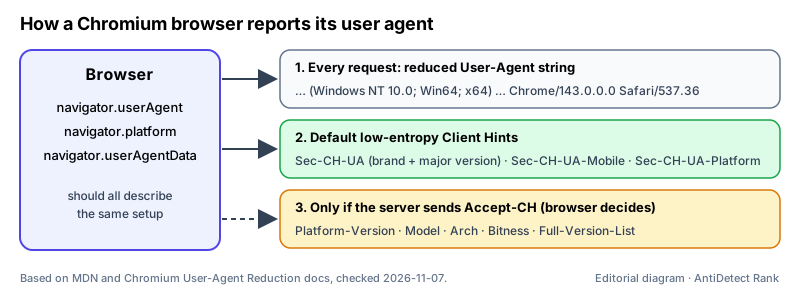
In HTTP, the user agent is the client software making a request, and the User-Agent request header is the text string it sends so servers can identify the application, operating system, vendor and version. MDN notes that this information has historically raised privacy concerns because it can be used for fingerprinting. Modern Chromium browsers send a reduced string and move the detailed values into User-Agent Client Hints (Sec-CH-UA-* headers and navigator.userAgentData).
How it works
- The browser sends User-Agent with every request; a typical Chrome desktop value looks like "Mozilla/5.0 (Windows NT 10.0; Win64; x64) AppleWebKit/537.36 (KHTML, like Gecko) Chrome/143.0.0.0 Safari/537.36". The "Mozilla/5.0", "KHTML, like Gecko" and "Safari" tokens are kept for historical compatibility.
- Since User-Agent reduction (rolled out from Chrome 101 to 110), Chrome freezes the minor version to 0.0.0, uses fixed desktop platform strings, and on Android sends a fixed "Android 10; K" instead of the real OS version and device model. The same reduced value appears in navigator.userAgent and navigator.platform.
- Chromium browsers also send low-entropy Client Hints by default — Sec-CH-UA (brands and major version), Sec-CH-UA-Mobile and Sec-CH-UA-Platform. A server can ask for high-entropy hints such as platform version, model, architecture or full version list with the Accept-CH response header, and the browser decides what to return.
Why it matters
- The user agent is one of the passive signals in a browser fingerprint: it arrives on every request without any script running.
- Detection systems can compare the User-Agent string with Client Hints and JavaScript values (navigator.platform, screen size, touch support). A profile whose values disagree stands out more than one that is simply common.
- Antidetect browsers let each profile set its user agent; good tools keep the matching Client Hints, platform and browser-engine version consistent with it.
Limits and common misconceptions
- "Changing the User-Agent string changes my browser fingerprint." It changes one value; Client Hints, JavaScript APIs, Canvas/WebGL output and fonts still describe the real setup unless they are changed consistently too.
- "The User-Agent string shows my exact OS and device." In reduced Chrome it no longer does — Windows 8.1 and Windows 11 both report "Windows NT 10.0", and Android devices report "Android 10; K".
- "A rare or very new user agent is safer." Unusual or mismatched values narrow you down; a common, internally consistent combination is less distinctive.
Example: A profile claims "Macintosh; Intel Mac OS X 10_15_7" in its User-Agent, but its Sec-CH-UA-Platform hint says "Windows" and navigator.platform returns "Win32". A site comparing these three values can see the profile is not what it claims.
No browser or proxy can guarantee that accounts will not be restricted. Follow each platform's rules.
Related terms
- Browser fingerprint — A combination of browser and device characteristics that can identify a browser without cookies.
- Canvas fingerprinting — Identifying a device from tiny differences in how it renders an HTML canvas drawing.
- Browser profile — A separate set of browser data — cookies, history, settings, extensions — kept apart from other profiles.
Sources
- MDN: User-Agent header (browser docs)
- MDN: HTTP Client hints (browser docs)
- Chromium: User-Agent Reduction (browser docs)
- Chrome for Developers: User-Agent Client Hints (browser docs)
Checked 2026-11-07.