 AntiDetect Rank
Glossary · Fingerprinting
Browser fingerprint
A combination of browser and device characteristics that can identify a browser without cookies.
Definition
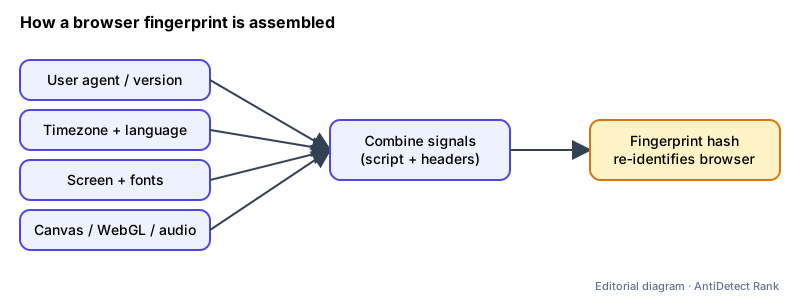
A browser fingerprint is the set of characteristics a website can read from a browser and its device — such as browser version, timezone, language, installed fonts, codecs and screen size — combined into an identifier. MDN describes fingerprinting as identifying a browser, and by extension a user, by collecting and combining these distinguishing features.
How it works
- Some values arrive passively with every request, for example the User-Agent and Accept-Language headers. The W3C calls this passive fingerprinting.
- Others are collected actively by JavaScript or CSS running on the page: screen resolution, timezone, font lists, Canvas or WebGL rendering output and more.
- Each value alone is common; combined, they can narrow a browser down to a small group or a single device. No single attribute has to be unique.
Why it matters
- Fingerprints can link visits across sites without cookies, and the W3C notes that clearing cookies or using a VPN does not stop that correlation.
- Sites also use fingerprints for fraud and abuse detection, for example to spot many accounts coming from one device.
- For legitimate multi-account work (agencies, QA, separate client accounts), understanding fingerprints explains why separate browser profiles exist.
Limits and common misconceptions
- "Incognito mode hides my fingerprint." Private windows clear stored data, but the device characteristics a page can read stay largely the same.
- "A random fingerprint is safest." Inconsistent values — say, a mobile user agent with a desktop screen — can be more distinctive than a common, consistent setup.
- "Fingerprinting can be eliminated." The W3C guidance states that completely eliminating fingerprinting by a determined adversary through widely deployed technical means is implausible; mitigations reduce it.
Example: Two laptops with the same browser version can still differ in timezone, installed fonts and GPU. A script reading those values plus a Canvas render can tell them apart even after cookies are cleared.
No browser or proxy can guarantee that accounts will not be restricted. Follow each platform's rules.
Related terms
- Canvas fingerprinting — Identifying a device from tiny differences in how it renders an HTML canvas drawing.
- WebGL fingerprinting — Using WebGL graphics information and rendering output to identify a device.
- User agent (User-Agent string) — The browser and OS identification a browser sends in the User-Agent header and exposes to JavaScript.
- Browser profile — A separate set of browser data — cookies, history, settings, extensions — kept apart from other profiles.
Sources
- MDN Glossary: Fingerprinting (browser docs)
- W3C: Mitigating Browser Fingerprinting in Web Specifications (standard)
Checked 2026-11-07.