 AntiDetect Rank
Glossary · Fingerprinting
WebGL fingerprinting
Using WebGL graphics information and rendering output to identify a device.
Definition
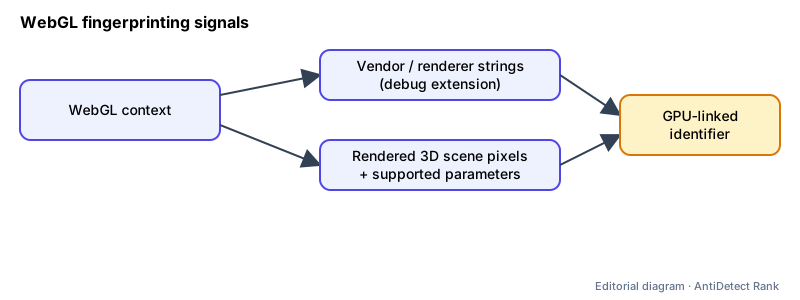
WebGL fingerprinting uses the WebGL API — the browser interface for GPU-accelerated 2D and 3D graphics — to collect device-specific signals: graphics vendor and renderer strings, supported parameters and extensions, and the pixels of a rendered scene.
How it works
- A script opens a WebGL context and queries capabilities with getParameter() and the list of supported extensions.
- Where available, the WEBGL_debug_renderer_info extension exposes UNMASKED_VENDOR_WEBGL and UNMASKED_RENDERER_WEBGL — the graphics driver's vendor and renderer strings.
- It may also render a 3D scene and hash the result, similar to canvas fingerprinting.
Why it matters
- GPU details are stable over time and vary between devices, making them a strong signal.
- Mismatches matter: a profile claiming to be a Mac while reporting a Windows-only GPU driver string is easy to flag.
Limits and common misconceptions
- "Every site can always read my GPU model." MDN notes that, depending on browser privacy settings, the debug extension may be limited to privileged contexts or not work at all; with Firefox's privacy.resistFingerprinting enabled it is disabled.
- "Disabling WebGL makes me invisible." Turning it off is itself a rare, noticeable trait and breaks sites that need it.
Example: A page reading the unmasked renderer string may see a specific GPU and driver family, which together with screen size and fonts narrows the device down considerably.
No browser or proxy can guarantee that accounts will not be restricted. Follow each platform's rules.
Related terms
- Canvas fingerprinting — Identifying a device from tiny differences in how it renders an HTML canvas drawing.
- Browser fingerprint — A combination of browser and device characteristics that can identify a browser without cookies.
Related guides
Sources
- MDN: WebGL API (browser docs)
- MDN: WEBGL_debug_renderer_info extension (browser docs)
Checked 2026-11-07.