 AntiDetect Rank
Glossary · Profiles & sessions
Sticky session (proxy)
A proxy setting that keeps the same exit IP across consecutive requests for a period of time.
Definition
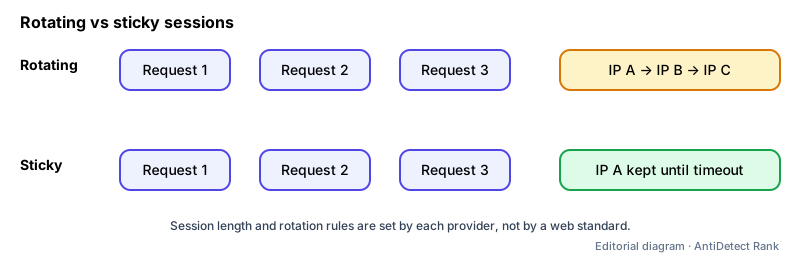
A sticky session is a proxy provider feature that routes a series of requests through the same exit IP instead of rotating to a new one each time. It is defined by each provider's product, not by a web standard, so session length, triggers and failure behaviour differ between providers. (In load balancing, "sticky session" means something different: pinning a user to one backend server.)
How it works
- You add a session identifier to the proxy username or use a dedicated port; requests with the same identifier reuse one exit IP.
- Example from Oxylabs' documentation: residential proxies rotate on every request by default; a sessid parameter keeps the same IP for 10 minutes by default (or until 60 seconds of inactivity), sesstime extends it up to 1440 minutes.
- If the residential device goes offline, some providers silently rotate to a new IP, while strict single-IP modes return an error (Oxylabs: HTTP 502 for sessid_oneip).
Why it matters
- Logged-in workflows usually need a stable IP for the length of a session; an IP that changes mid-login can trigger security checks.
- Knowing whether your provider rotates or fails on disconnect helps you choose the right mode for a browser profile.
Limits and common misconceptions
- "Sticky means permanent." Sessions expire and residential peers can disconnect; plan for the IP to change eventually.
- "Session time guarantees completion." Oxylabs notes the session ends when the timer expires even if requests are still in progress.
Example: A QA tester runs a 20-minute checkout test through one browser profile using a sticky session set to 30 minutes, so the whole flow appears from one location.
No browser or proxy can guarantee that accounts will not be restricted. Follow each platform's rules.
Related terms
- Residential proxy — A proxy whose exit IP belongs to a consumer internet connection rather than a datacenter.
- Browser profile — A separate set of browser data — cookies, history, settings, extensions — kept apart from other profiles.
- WebRTC leak — When WebRTC reveals an IP address that differs from the proxy or VPN address a site otherwise sees.
Related guides
Sources
- Oxylabs docs: Session Control & IP Rotation (vendor docs)
- Bright Data docs: Introduction to Residential proxies (vendor docs)
Checked 2026-11-07.