 AntiDetect Rank
Glossary · Network & proxies
WebRTC leak
When WebRTC reveals an IP address that differs from the proxy or VPN address a site otherwise sees.
Definition
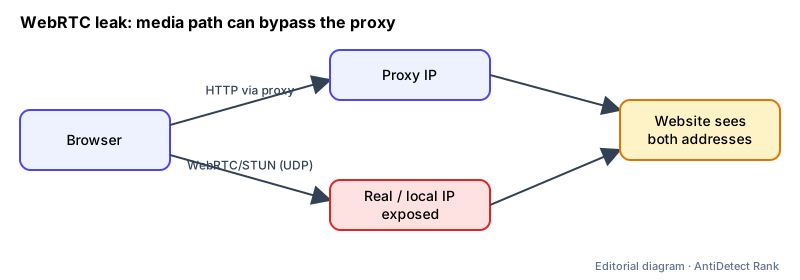
A WebRTC leak happens when the browser's real-time communication stack exposes an IP address — such as the real public IP or a local network address — that the user expected to be hidden behind a proxy or VPN. WebRTC gathers network candidates (ICE candidates) to set up peer-to-peer audio, video or data connections.
How it works
- To find a connection path, WebRTC gathers ICE candidates from local interfaces and from STUN/TURN servers; each candidate includes an address.
- An HTTP proxy only carries HTTP traffic. WebRTC media usually uses UDP, which HTTP proxies and most SOCKS proxies do not carry, so it can take a different route.
- RFC 8828 defines four IP-handling modes, from "enumerate all addresses" (most disclosure) to "force proxy", where WebRTC traffic must go through the proxy or else UDP is disabled.
Why it matters
- A site that sees a proxy IP in HTTP traffic and a different IP in WebRTC candidates learns both — undermining privacy and creating an obvious mismatch.
- Browsers and antidetect tools offer WebRTC settings (disable, replace, or align with the proxy) for this reason.
Limits and common misconceptions
- "Any VPN or proxy fixes it." Whether a leak occurs depends on the browser's WebRTC IP-handling mode and how the proxy or VPN routes traffic.
- "Disabling WebRTC is the only fix." RFC 8828 also allows modes that limit gathered addresses to the default route or force traffic through the proxy; the trade-off is call quality or connectivity.
Example: A browser profile uses an HTTP proxy in Germany. A test page sees a German IP over HTTP but receives a WebRTC candidate showing the user's real ISP address in another country.
No browser or proxy can guarantee that accounts will not be restricted. Follow each platform's rules.
Related terms
- Residential proxy — A proxy whose exit IP belongs to a consumer internet connection rather than a datacenter.
- Sticky session (proxy) — A proxy setting that keeps the same exit IP across consecutive requests for a period of time.
- Timezone and geolocation mismatch — When the location implied by a connection's IP address disagrees with the browser's time zone or reported coordinates.
- Browser fingerprint — A combination of browser and device characteristics that can identify a browser without cookies.
Sources
- MDN: WebRTC API (browser docs)
- MDN: RTCIceCandidate (browser docs)
- IETF RFC 8828: WebRTC IP Address Handling Requirements (standard)
Checked 2026-11-07.