 AntiDetect Rank
Timezone and geolocation mismatch
When the location implied by a connection's IP address disagrees with the browser's time zone or reported coordinates.
Definition
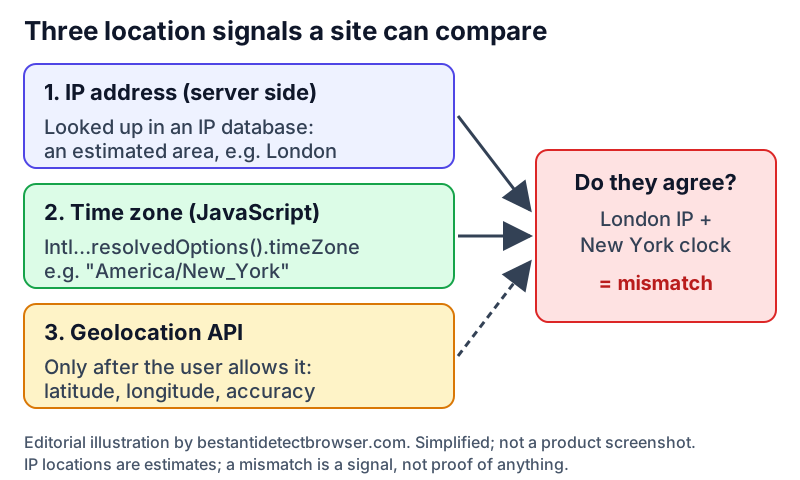
A timezone and geolocation mismatch happens when the location signals a website can see do not tell the same story. The server estimates a location from the visitor's IP address; JavaScript can read the browser's time zone (an IANA name such as "Europe/London") and UTC offset; and, only with the user's permission, the Geolocation API can return latitude and longitude. If a connection appears to come from London while the browser clock says New York, the combination is unusual and can be used as one signal in a browser fingerprint or risk check.
How it works
- IP location is inferred on the server side from databases such as MaxMind GeoIP. MaxMind describes it as an approximate area with an accuracy radius, not an address: it estimates country-level accuracy at about 99.8%, but around 66% for US cities within 50 km, and notes that behind a VPN or proxy it locates the server, not the person.
- The browser time zone needs no permission. new Intl.DateTimeFormat().resolvedOptions().timeZone returns the runtime's default IANA time zone, and Date.prototype.getTimezoneOffset() returns the offset from UTC in minutes (for example -60 for UTC+1), which changes across daylight saving time in zones that observe it.
- Precise coordinates come from the Geolocation API (navigator.geolocation.getCurrentPosition). It works only in secure (HTTPS) contexts, is limited by the geolocation Permissions Policy, and requires express user permission. The W3C specification says sources can include GPS, Wi-Fi, cell IDs and IP address, and gives no guarantee that the result is the device's actual location.
- A site or anti-fraud script can then compare the three: does the IP country fit the time zone, and do any shared coordinates fall inside the IP's estimated area? Language and locale settings are sometimes looked at too, but they are user preferences and differ legitimately from location far more often.
Why it matters
- When you route a browser through a proxy, only the IP changes. The time zone still comes from the computer, so a Paris-time laptop on a Los Angeles proxy shows an obvious gap. Multilogin's help documentation gives exactly this kind of example for its "Real" timezone setting.
- Antidetect browsers therefore usually offer to derive the profile's time zone and geolocation coordinates from the proxy's location. Multilogin, for example, documents a default "Masked" mode that matches the timezone to the proxy and generates coordinates near the proxy's approximate location, plus "Custom" and "Real" options.
- For legitimate work — QA of localized sites, ad verification, managing client accounts in different regions — keeping location signals consistent avoids pages, prices and security prompts that do not match the region being tested.
Limits and common misconceptions
- "A VPN or proxy changes my time zone." It changes the IP address the site sees; the time zone and Geolocation API values come from the browser and device unless they are changed separately.
- "Any mismatch means fraud." Travellers, corporate VPNs, mobile networks and privacy relays all produce honest mismatches, and IP geolocation itself is an estimate. Sites typically weigh it as one signal among many.
- "Blocking location access hides my location." Denying the Geolocation permission withholds coordinates, but the IP address and time zone are still visible without any prompt.
- "Matching the time zone makes a profile undetectable." It removes one inconsistency. Fingerprints combine many other values — user agent, fonts, Canvas, WebGL, WebRTC — and no setting guarantees an account will not be restricted.
No browser or proxy can guarantee that accounts will not be restricted. Follow each platform's rules.
Related terms
- WebRTC leak — When WebRTC reveals an IP address that differs from the proxy or VPN address a site otherwise sees.
- Residential proxy — A proxy whose exit IP belongs to a consumer internet connection rather than a datacenter.
- Browser fingerprint — A combination of browser and device characteristics that can identify a browser without cookies.
- Browser profile — A separate set of browser data — cookies, history, settings, extensions — kept apart from other profiles.
Sources
- MDN: Geolocation API (browser docs)
- W3C: Geolocation (Candidate Recommendation Draft) (standard)
- MDN: Intl.DateTimeFormat resolvedOptions() (browser docs)
- MDN: Date.prototype.getTimezoneOffset() (browser docs)
- MaxMind: Geolocation accuracy (vendor docs)
- Multilogin help: Browser profile settings — Fingerprint section (vendor docs)
Checked 2026-11-09.